When optimizing a website, most people focus on keywords, content, and backlinks. While these are essential for SEO, one small detail is often overlooked: the SEO slug.
A well-optimized URL slug helps both users and search engines understand what a page is about before they even click on it. It won’t magically put your page at the top of Google, but it contributes to a better user experience, improved crawlability, and a cleaner website structure. Google recommends using descriptive, human-readable URLs with simple words and hyphens where possible.
In this guide, you’ll learn what an SEO slug is, why it matters, how to create SEO-friendly URLs, and the common mistakes to avoid.
What Is an SEO Slug?
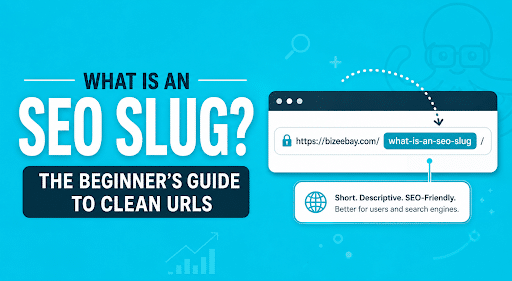
An SEO slug is the part of a URL that identifies a specific page on your website.
For example:
Full URL
https://bizeebay.com/blog/what-is-an-seo-slug
The slug is:
what-is-an-seo-slug
Think of it as the page’s address. It tells visitors and search engines what the page is about before they open it.
Why Does an SEO Slug Matter?
Although URL slugs aren’t among Google’s strongest ranking factors, they play an important role in creating a well-optimized website.
A clean URL can help:
- Improve user experience
- Make URLs easier to read and remember
- Help search engines understand page topics
- Increase click-through rates
- Create better website architecture
- Simplify internal linking
A URL like:
bizeebay.com/blog/seo-slug-guide
is much easier to understand than:
bizeebay.com/post?id=48729&page=12
Google recommends descriptive URLs that people can easily interpret.
SEO Slug vs URL: What's the Difference?
Many beginners confuse these terms.
URL
A URL is the complete web address.
Example:
https://bizeebay.com/blog/what-is-an-seo-slug
Slug
The slug is only the final part.
Example:
what-is-an-seo-slug
The slug is just one component of your website’s overall URL structure.
SEO Slug Examples
Good SEO Slugs
/seo-slug-guide
/technical-seo-checklist
/wordpress-seo-tips
/shopify-seo
/local-seo-services
Poor SEO Slugs
/post-29483
/page?id=22
/new-post-final-version
/seo_article_2026_updated_final
The first group clearly describes the page. The second group doesn’t tell users—or search engines- what they’ll find.
Best Practices for Creating SEO-Friendly URL Slugs
1. Include Your Primary Keyword
Your primary keyword should naturally appear in the slug.
For this article:
Keyword:
SEO Slug
Good slug:
/seo-slug-guide
Avoid stuffing multiple keywords into the URL.
2. Keep URLs Short
Long URLs become difficult to read, share, and remember.
Instead of:
/how-to-create-the-best-seo-friendly-url-slugs-for-beginners
Use:
/seo-slug-guide
Short, descriptive URLs are generally preferred.
3. Use Hyphens Instead of Underscores
Google recommends separating words with hyphens.
Correct:
seo-slug-guide
Incorrect:
seo_slug_guide
Hyphens make URLs easier for both users and search engines to understand.
4. Use Lowercase Letters
Keep URLs consistent by using lowercase only.
Good:
/wordpress-seo
Bad:
/WordPress-SEO
Consistency makes URLs easier to manage and prevents duplicate URL issues on some servers.
5. Remove Unnecessary Words
Words like:
- the
- and
- of
- a
- in
usually don’t add value.
Instead of:
/what-is-an-seo-slug-for-beginners
Try:
/seo-slug-guide
6. Avoid Special Characters
Your slug should never contain:
- %
- &
- !
- ?
- @
Keep URLs clean and readable.
7. Don't Change URLs Without a Reason
Changing an existing URL can impact SEO if not handled correctly.
If you must change a slug:
- Create a 301 redirect.
- Update internal links.
- Update your sitemap.
- Monitor Search Console for crawl issues.
Avoid changing URLs simply to make them “look nicer” if they’re already performing well.
Common SEO Slug Mistakes
Here are some mistakes we frequently see:
Using Dates
Bad:
/best-seo-tools-2024
Better:
/best-seo-tools
This makes future updates much easier.
Making URLs Too Long
Bad:
/everything-you-need-to-know-about-search-engine-optimization-for-small-businesses
Better:
/small-business-seo
Keyword Stuffing
Bad:
/seo-services-seo-company-best-seo-agency-seo
Natural URLs perform much better for users.
Using Random Numbers
Bad:
/post-12384
Good:
/technical-seo-audit
How to Edit an SEO Slug in WordPress
WordPress makes editing slugs simple.
- Open the page or post.
- Click on the permalink settings.
- Edit the URL slug.
- Save your changes.
If the page is already live, remember to add a 301 redirect if the URL changes.
SEO Slug Best Practices Checklist
Before publishing a page, ask yourself:
- Is the URL short?
- Does it include the primary keyword?
- Is it easy to read?
- Does it use hyphens?
- Is everything lowercase?
- Have unnecessary words been removed?
If the answer is yes, you’re on the right track.
How SEO Slugs Fit Into Your Overall SEO Strategy
An optimized slug is only one piece of the puzzle.
For long-term SEO success, combine clean URLs with:
- Technical SEO
- Keyword research
- High-quality content
- Internal linking
- Fast website performance
- Structured data
- Quality backlinks
Together, these elements create a stronger foundation for organic growth.
If you’re looking for a complete strategy, explore our SEO Services to learn how BizeeBay helps businesses improve search visibility through technical SEO, content optimization, on-page SEO, and long-term organic growth.
Build a Stronger SEO Foundation with Clean URL Slugs
Creating SEO-friendly URL slugs is one of the simplest yet most effective on-page SEO improvements you can make. Clean, descriptive URLs enhance the user experience, help search engines better understand your content, and make your website easier to navigate.
While an optimized URL slug won’t dramatically improve rankings on its own, it’s an essential part of a well-rounded SEO strategy. When combined with high-quality content, technical SEO, strategic internal linking, and a well-structured website, clean URLs contribute to stronger search visibility and a better experience for both users and search engines.
Whether you’re launching a new website or optimizing an existing one, don’t overlook your URL structure. Small improvements like creating clear, keyword-focused slugs can have a lasting impact on your website’s organization, usability, and long-term SEO success.
Frequently Asked Questions
What is an SEO slug?
An SEO slug is the last part of a URL that identifies a specific page. It should clearly describe the page using short, readable words.
Do URL slugs affect SEO?
Yes, but indirectly. While they aren’t a major ranking factor, descriptive slugs improve usability, help search engines understand page content, and contribute to better site organization.
Should I include keywords in my slug?
Yes. Include your primary keyword naturally, but avoid keyword stuffing.
How long should a URL slug be?
Aim for three to five descriptive words whenever possible. Keep it concise while accurately describing the page.
Can I change an existing slug?
Yes, but only when necessary. If you change a live URL, always implement a 301 redirect to preserve SEO value and avoid broken links.